TL;DR — Quick Summary
Aspel SAE credit note: invalid CfdiRelacionados UUID. Fix relation type 01/03, source invoice and prior stamp before applying customer credit.
An error involving CfdiRelacionados in Aspel SAE blocks the normal factura de ingreso timbrada workflow and may trigger SAT, IMSS, or PAC rejection. This article explains typical messages, catalog and period data causes, and an ordered fix without duplicating movements or folios.
The Error
“El UUID no existe o no corresponde al RFC emisor”
“TipoRelacion inválido para nota de crédito”
“Error en CfdiRelacionados”
Root Causes
Incomplete period data
A prior movement was not closed, IMSS tables were not imported, or SAT catalogs for the month are missing.
Wrong catalog or template
Invoice, customer, or employee templates inherit values from another tax ID or fiscal year.
Expired certificate, CSD, or e.firma
The seal or signature does not match the active RFC; PAC or SUA rejects before save.
Outdated system version
An unreplicated Aspel, SUA, or XSD validator build applies old Annex 20 rules.
Misaligned module interface
SAE, NOI, COI, IDSE, and SUA must share the same RFC, employer registry, and open period.
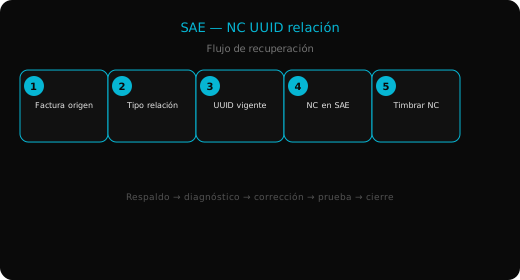
Step-by-Step Fix
1. Backup and isolate the case
Copy databases and export XML or .SUA for the affected voucher or employee. Work on a copy if the period remains open.
2. Verify tax IDs and period
Confirm issuer and receiver RFC, employer registry, and that the month is not closed in accounting or payroll.
3. Fix the field that triggers rejection
Adjust the field cited in the message: relation UUID, Exportacion, Infonavit discount, payment line, or duplicate folio.
4. Recalculate and validate without batch stamping
Use payroll recalc, SAT validator, or SIPARE line generation on a single pilot record.
5. Run the final operation and archive proof
Stamp, post to ledger, pay at the bank, or import movements; keep PDF, XML, and internal log.
Prevention
- Sync SAT and IMSS catalogs at each month start.
- Renew CSD and e.firma 30 days early.
- Do not share templates across multi-RFC companies without checking issuer.
- Schedule backups before closes and fee payments.
- Reconcile stamped XML against IDSE movements and accounting.
Summary
- Errors usually come from period data, templates, or misaligned certificates.
- Recommended order: backup, read message, fix key field, unit test, final operation.
- Check SAE–COI–NOI–SUA–IDSE interfaces share RFC and open period.
- Archive XML, .SUA, and screenshots for SAT and IMSS audit.
Related Articles
- Timeout timbrado PAC
- UUID complemento pago
- Cancelación factura
- Precio unitario cero
- Hub Aspel troubleshooting
In production, document each change with screenshots, server time, and the Windows user who applied the fix. If the error returns after restoring a backup, compare your Aspel or SAT validator version with the technical release notes for the current fiscal period. PAC and IMSS support desks typically need the unchanged XML or .SUA file to reproduce the rejection. Keep working copies on a local path outside cloud sync to avoid locking MDB or GDB files during stamping or ledger posting.In production, document each change with screenshots, server time, and the Windows user who applied the fix. If the error returns after restoring a backup, compare your Aspel or SAT validator version with the technical release notes for the current fiscal period. PAC and IMSS support desks typically need the unchanged XML or .SUA file to reproduce the rejection. Keep working copies on a local path outside cloud sync to avoid locking MDB or GDB files during stamping or ledger posting.