TL;DR — Quick Summary
Fix Aspel NOI finiquito and liquidación errors: tenure, daily wage, LFT concepts, ISR Art. 174, and payroll CFDI stamping.

When Aspel NOI fails to calculate finiquito or liquidación — or amounts do not match Federal Labor Law (LFT) and ISR rules — payroll stops on the employee’s last day. Messages like “Error calculating finiquito”, negative ISR, or zero severance usually trace to master data, not a random engine bug. This guide orders causes and fixes for Mexican deployments.
The error
Typical symptoms:
Error calculating finiquito
Error calculating extraordinary perceptions
Cannot process employee termination
Incorrect ISR on severance
Indemnity $0.00 with more than one year of service
PAC rejects payroll CFDI due to inconsistent ISR
Silent mismatches also occur: vacation premium on the report but not on the printed receipt, or constitutional indemnity missing because termination reason was coded as finiquito only.
Finiquito vs liquidación
| Finiquito | Liquidación | |
|---|---|---|
| When | End of employment (benefits settlement) | Separation with statutory severance |
| Includes | Proportional benefits + pending wages | Finiquito + 90 days + 20 days/year + seniority premium (case-dependent) |
| ISR | Art. 96 and UMA exemptions | Art. 174 separation income limits |
| In NOI | Termination type / finiquito period | Reason that enables indemnity concepts |
Wrong termination reason yields finiquito-only math when liquidación applies (or the reverse).
Cause 1: Wrong hire or termination date
Tenure drives proportional Christmas bonus, unused vacation, vacation premium, and 20-days-per-year indemnity.
Check Catalog → Employees:
- Hire date — first day of service.
- Termination date — last day worked.
- Rehires — broken tenure if prior termination/rehire chain is wrong.
Cause 2: Daily wage, integrated salary, integration factor
Problems:
- Raise in termination month without SDI recalculation.
- Mixed compensation formula using base only.
- UMA exemptions not applied on bonus ISR.
Run Processes → Recalculate integrated salary before finiquito.
Cause 3: Misconfigured payroll concepts
Each perception needs correct SAT key, extraordinary/termination type, and formula with tenure.
If a concept is inactive or formula returns zero, NOI shows a generic calculation error.
Cause 4: Wrong payroll period type
Use an extraordinary or finiquito/liquidación period—not open ordinary payroll with the employee still active.
Correct sequence:
- Register termination.
- Create dedicated finiquito period.
- Calculate and review pre-liquidation report.
- Stamp CFDI.
Mixing into ordinary period triggers “Error calculating extraordinary perceptions”.
Cause 5: Outdated ISR, UMA, or subsidy tables
Zero or negative ISR blocks stamping.
Update Configuration → Tables → ISR / UMA for the current fiscal year and NOI service pack.
Cause 6: Stamping after bad math
The PAC validates payroll complement totals and employment dates. Fix calculation first, then Processes → Payroll CFDI stamping.
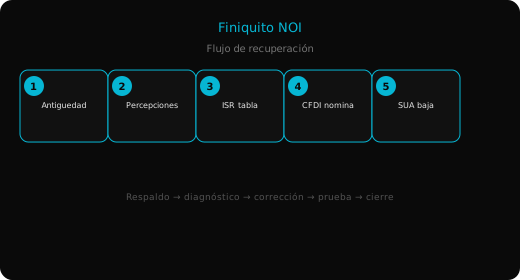
Step-by-step fix
- Freeze employee data snapshot (hire, termination, reason, pay history).
- Update tables and NOI patch.
- Register termination with correct LFT reason.
- Create finiquito-only period.
- Recalculate and validate pre-liquidation report.
- Fix zero lines (formulas / active indemnity concepts).
- Stamp and deliver receipt.
- Export IMSS/SUA movements after termination (SUA export guide).
Prevention
- Termination checklist: hire date, pending vacation, latest integrated salary, LFT reason.
- Simulate finiquito before the employee meeting.
- Do not change historical hire date without contract backup.
- Refresh ISR tables each January and UMA updates.
Summary
- Failures are usually tenure, pay/SDI, concepts, or wrong period—not random bugs.
- Set finiquito vs liquidación via termination reason.
- Use extraordinary period and current ISR/UMA tables before stamping.