TL;DR — Quick Summary
Fix SUA IMSS invalid or duplicate NSS on import. Validate 11 digits, IDSE roster, prior movements, and clean the TXT file before resubmitting to IMSS.

The invalid NSS or duplicate NSS message in IMSS SUA blocks hires, terminations, salary changes, and bulk import of affiliation movements. Unlike a generic connectivity failure, this points to worker data that fails local SUA checks and IDSE validation when transmitted to the institute. One mistyped NSS in a large spreadsheet can reject an entire import batch, delay quota calculation, and prevent timely SIPARE file generation.
This guide explains how these errors occur, how to validate NSS correctly, and how to remove duplicates before resubmitting movements to IMSS.
The Error
When registering a worker, capturing a movement, or importing a .txt file, SUA may show:
“Invalid NSS”
“NSS not found in insured roster”
“Duplicate NSS for employer registration”
“Duplicate movement: record already exists with same NSS and date”
Bulk imports produce a line-by-line report. Partial processing forces manual reconciliation of which workers were updated.
Cause of the Problem
The Social Security Number (NSS) is the worker’s primary IMSS identifier. SUA validates three layers:
- Format: 11 numeric digits with valid check digit.
- Existence: NSS must exist in IMSS records or be created through a proper registration.
- Uniqueness: incompatible duplicate movements for the same NSS, period, and registration.
Incorrect NSS format
Common sources are manual entry and Excel exports:
- 10 digits after dropping a leading zero.
- Spaces, dashes, or scientific notation when pasting from spreadsheets.
- Transposed digits breaking the check digit.
- CURP confused with NSS from HR feeds.
SUA rejects locally; IDSE never receives the movement.
NSS not in roster
This happens when:
- The worker is new and has no NSS yet.
- NSS belongs to another person or was cancelled.
- A provisional wrong NSS was copied from unofficial documents.
SUA may allow local capture in some cases, but IDSE returns Rejected against the central roster.
Duplicate NSS in SUA or file
Local duplicate means repeated lines in .txt, active worker already registered, or rehire captured as new hire without closing prior employment.
Institutional duplicate means the worker remains active under another employer registration. IMSS rejects the second relationship until the situation is regularized.
Payroll, SUA, and IDSE drift
Payroll sometimes uses a different NSS than IMSS (e.g., old NSS on rehire). Accepted IDSE movements never imported into SUA are later flagged as duplicates when recaptured locally.
Step-by-Step Solution
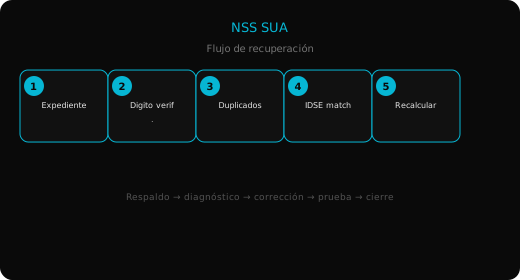
1. Back up and document
Copy SUA.MDB, note patron registration, NSS, movement type, date, and whether the error was on single capture or import. Keep original .txt and SUA error report.
2. Validate format and check digit
Confirm 11 digits. Compare against IMSS assignment notice character by character. Fix upstream in payroll before returning to SUA.
3. Query IDSE and local base
In IDSE, verify insured status by NSS. In SUA check worker inquiry and movement history. Ensure proper termination before rehire.
4. Clean import file
Use Notepad++, ANSI encoding, pipe separator, DD/MM/YYYY dates, Windows line endings. Remove duplicates; order terminations before hires when regularizing rehires in one batch.
Re-import via Utilities > Import affiliation movements until all lines show Accepted.
5. Recapture, send to IDSE, reconcile
For single movements use Affiliation > Affiliation movements. Download IDSE .txt response and re-import into SUA. Compare local vs IDSE acuse before quota calculation or SIPARE generation.
Prevention
- Maintain a single validated NSS catalog in payroll tied to IMSS, not expired IDs.
- Format Excel columns as text to preserve leading zeros.
- Import weekly instead of only at bimestre close.
- Register new workers before salary modifications or rehires.
- Back up
SUA.MDBbefore every bulk import.
Summary
- Invalid NSS is usually bad format, wrong check digit, or missing roster record.
- Duplicate NSS means repeated file lines, hire without termination, or active relationship elsewhere.
- Validate in IDSE, clean
.txt, and re-import until all movements are Accepted. - Fix NSS at the payroll source to avoid repeating the error next period.