TL;DR — Quick Summary
CFDI SAT error 307: XML schema validation fails when stamping. Fix namespaces, SAT catalogs, complements, and XSD version before resubmitting to your PAC.

CFDI error 307 means the invoice XML failed schema validation required by SAT before or during PAC stamping. Unlike business-rule rejections or certificate errors (401), 307 is structural: the file does not match the official XSD for the invoice version, its complements, or referenced catalog keys. Until schema validation passes, no TimbreFiscalDigital is added and there is no UUID.
Common triggers include SAT schema updates, ERP version mismatches, and custom XML templates not aligned with CFDI 4.0. This guide covers the message, technical causes, and recovery steps.
The Error
When sending XML to the PAC or ERP stamping service you may see:
307 - XML schema validation error
Element ‘cfdi:Comprobante’ is invalid according to XSD
Attribute ‘Version’ does not match declared namespace
Complement node does not comply with published schema
Some PACs return an approximate XPath; others only show generic 307, forcing full validation with the SAT schema tool.
Cause of the Problem
Schema validation enforces:
- Required node order and presence in XSD.
- Data types (decimal with dot, ISO 8601 dates).
- Max lengths on attributes.
- Namespaces for CFDI 4.0 and nested complements.
- Catalog keys required in later validation steps.
Outdated CFDI version or namespace
Templates still on 3.3 while stamping expects 4.0, or Version="4.0" with a 3.3 namespace, fail immediately. Missing ERP patches after SAT publications produce the same result.
Missing or misspelled required attributes
Frequent CFDI 4.0 gaps:
Exportacionon the invoice.ObjetoImpon each line item.RegimenFiscalReceptorandDomicilioFiscalReceptorwhen required.- Incorrect tax breakdown under
Impuestos.
Custom attribute names (UsoCfdi vs UsoCFDI) also trigger 307.
Misstructured complements
Independent XSD files apply to Payments 2.0, Carta Porte 3.0, Payroll 1.2, and Foreign Trade. Wrong nesting under cfdi:Complemento, incompatible complement version, or removed nodes cause 307 even when the main body is valid.
Format values that look “almost” correct
- European comma decimals.
- Incomplete timestamps.
- Unescaped
&or control characters from PDF copy-paste. - Receiver RFC with spaces breaking XSD patterns.
Broken generation in integrations
String-concatenation APIs often omit closing tags or duplicate namespaces. EDI → CFDI and e-commerce mappers are weak points when SAT publishes new XSD files.
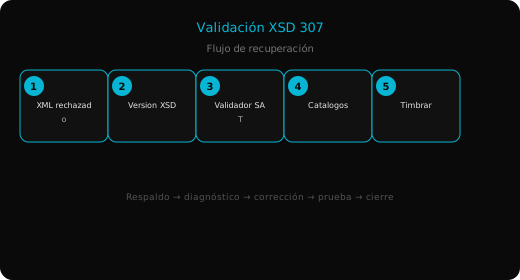
Step-by-Step Solution
1. Isolate rejected XML and PAC message
Export the failing XML and save PAC screenshots with date, issuer RFC, and internal folio. For nightly batches, check ERP or service logs.
2. Confirm invoice type and applicable XSD
Identify CFDI version, document type (income, credit, transfer, payment), and complements. Download current XSD packages from sat.gob.mx.
3. Validate with SAT tooling
Fix in order: namespaces and xsi:schemaLocation, missing nodes, invalid attribute types. Repeat until schema validation is clean.
4. Review catalogs and business rules
Validate product and unit keys, CFDI use vs receiver regime, and issuer ZIP even if XSD passes—some PACs map catalog failures to 307. Read the full text detail.
5. Fix ERP template and test stamp
Apply vendor patches, regenerate XML (avoid manual production edits), and stamp a symbolic live invoice. Confirm UUID, stamped XML download, and optional SAT CFDI lookup.
Prevention
- Monitor SAT schema announcements quarterly.
- Keep a low-volume test stamping path after ERP updates.
- Run XSD validation in CI if you generate XML in-house.
- Never edit stamped XML; regenerate pre-stamp.
- Enable only licensed, updated complements.
Summary
- Error 307 means XML does not match CFDI or complement XSD.
- Check 4.0 version, namespaces, and required nodes before blaming the PAC.
- Use SAT validation, fix catalogs, regenerate from ERP.
- A test invoice confirms schema acceptance.